Maze generator for kids
This maze generator for kids draws bright, friendly mazes with bold round walls, a green start dot and a star at the finish. Pick Easy for ages 4 to 6 or Medium for ages 7 to 10. Then print the puzzle page and keep the answer page for yourself.
By The Mazeloom team (Product and testing). Last updated .
How to use the maze generator for kids, step by step
- First, choose the Kids style for bold walls, colors, a green dot and a star.
- Then pick Easy for young children or Medium for older ones.
- Next, set the paths to long winding corridors, so the route is easy to follow.
- Press New maze a few times and pick a layout your child will like.
- Finally, download the PDF and print page one for the child.
The live preview is always free, and you get one free PNG and PDF export a day. See the pricing page for Pro, $19 once, with clean files and a commercial license, or read how we test every puzzle.
Which maze size fits which age
Young children need wide paths and few turns. So the Easy preset makes a grid of 10 columns and 12 rows, which suits ages 4 to 6. A child can trace it with a crayon, because each path is wide on a printed page.
Next, the Medium preset uses 18 by 22 cells for ages 7 to 10. Hard, at 28 by 34, is meant for teens, and Expert, at 44 by 56, is for adults. However, every child is different. If the first maze takes less than a minute, move up one level. If it ends in tears, go back down and try again next week.
What the kids style changes
The kids style draws thick walls with round ends, in soft colors on a white page. In addition, the start is a green dot and the finish is a star. A young child does not need to read "start" or "end", because the pictures say it for them.
Also, the bold walls help small hands. A thin line is easy to cross by mistake, while a thick one gives the pencil a clear edge. For a color free copy, turn on Black ink only. The walls stay bold, and the page copies well on a school printer.
A maze generator for kids in the classroom
Teachers often need many different mazes at once, for example one per table or one per week. Because every maze starts from a new random seed, no two children get the same puzzle unless you want them to. On the other hand, if the whole class should solve one maze, share the seed and everyone gets the same layout.
You can also type a title at the top, such as a class name or a theme word. Then the Puzzle book tab can build a booklet of up to 20 mazes for free, with the sizes growing page by page. As a result, a child starts with an easy win and ends with a real challenge.
Free downloads keep a small credit line at the bottom, and that is fine for your own class. However, if you sell the worksheets, Pro gives clean files with a commercial license for $19 once.
Tips to keep the maze fun
First, pick long winding paths, since they have fewer dead ends to frustrate a young solver. Then print the answer page and keep it hidden, so a stuck child can get one hint at a time. Finally, let the child press New maze and choose the next puzzle. Children stay with a game longer when they picked it.
Kids maze settings by age
| Level | Grid size and age |
|---|---|
| Easy | 10 x 12 cells, ages 4 to 6 |
| Medium | 18 x 22 cells, ages 7 to 10 |
| Hard | 28 x 34 cells, teens |
| Expert | 44 x 56 cells, adults |
| Kids style | Bold round walls, colors, green start dot, star finish |
Maze generator for kids tested with a real run
We built this maze with the same code the tool on this page uses, with this page's settings and a fixed seed. So the image and the numbers below come from that run, not from a mockup.
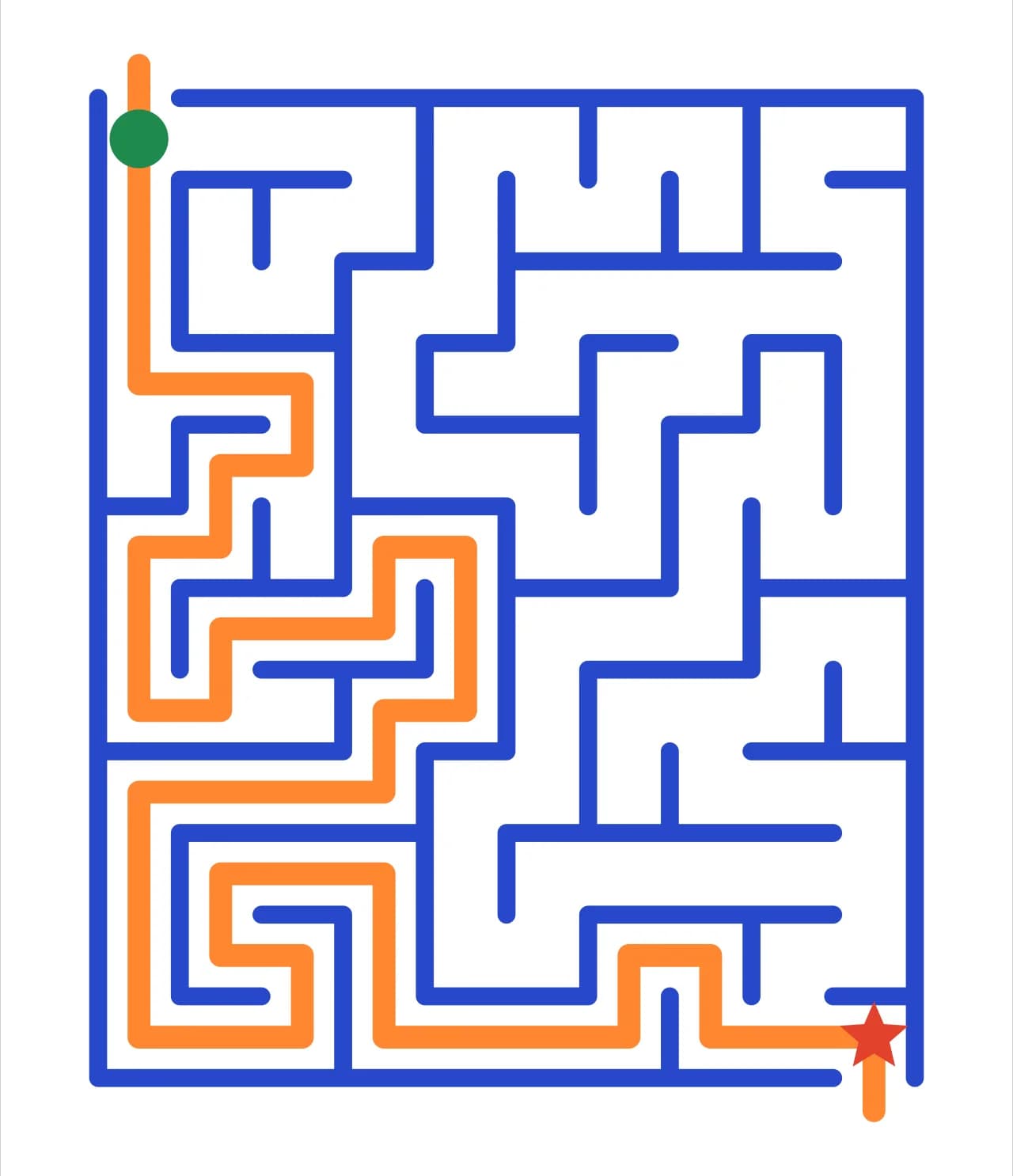
- Test input
- 10 x 12 grid, seed sample-maze-generator-for-k
- Output
- PNG + PDF with answer key
- Cells
- 120
- Dead ends
- 11
- Loops
- 0
- Answer length
- 45 cells
- PDF size
- 11 KB
- Build time
- 26 ms
How we check mazes: a solver walks every maze before it is saved, and we open each PDF to check the page, the answer key and the print size. More on the about page.
Maze generator for kids FAQ
What age is the easy maze for?
The Easy preset suits ages 4 to 6. It uses a 10 by 12 grid with wide paths that a child can trace with a crayon.
Does every kids maze have a solution?
Yes. A solver checks each maze before you see it, and every cell can be reached. Without loops or rooms, there is exactly one route.
Can I print kids mazes in black and white?
Yes. Turn on Black ink only. The walls stay bold and round, but the colors turn black, which saves ink and copies well.
Is the maze generator for kids free?
Yes. The preview is free and you get one free export a day. Free files carry a small credit line at the bottom.