Pixel maze generator
This pixel maze generator draws each wall as one solid square, so the maze looks like a retro video game screen. Pick the grid size, press New maze, and the blocks update at once. Then download a 300 DPI PNG and a two page PDF with the answer key, free for the first export each day.
By The Mazeloom team (Product and testing). Last updated .
How to use the pixel maze generator, step by step
- First, set the shape to Square grid, because the block look needs square cells.
- Then pick Block / pixel in the Style menu.
- Choose the columns and rows. For example, 20 by 20 gives a 41 by 41 block grid.
- Press New maze until the pattern of blocks looks right to you.
- Finally, press Download PNG + PDF to save the puzzle and the answer key.
The live preview is always free, and you get one free PNG and PDF export a day. See the pricing page for Pro, $19 once, with clean files and a commercial license, or read how we test every puzzle.
What makes a pixel maze different
A line maze draws thin strokes between cells. A pixel maze does the opposite. Here, each wall is a full square, just as wide as a path. So the whole picture becomes a grid of filled and empty squares, like a sprite from an old game console.
This look has a few practical perks. First, the blocks stay sharp at any print size, because there are no thin lines to blur. Also, kids can trace the white path with a thick marker and still stay inside the lines. As a result, the block style suits posters, coloring pages and classroom handouts.
How the pixel maze generator maps cells to blocks
The math is simple. A maze with c columns and r rows becomes a grid of 2c + 1 by 2r + 1 squares. Every cell gets one square, every gap between two cells gets one square, and the outer border adds one more row and column. For example, a 20 by 20 maze turns into a 41 by 41 block grid.
Then each square is either a wall or a floor. If two cells are joined, the square between them is floor. If they are not, it stays a wall. Because of this rule, you can count the blocks in any row and know exactly how wide the drawing will be. That makes planning easy when you copy the maze onto paper by hand.
Every maze is also checked by a solver before you see it. The solver walks the grid with a breadth first search, so every cell is reachable and the answer key shows the shortest route.
Use a pixel maze for cross stitch and graph paper
A block grid maps one to one onto squared paper. So you can print the PNG, then fill in one graph paper square for each dark block. In the same way, a cross stitch fan can treat each block as one stitch. A 15 by 15 maze becomes a 31 by 31 chart, which fits on a small piece of Aida cloth.
However, big grids grow fast. A 40 by 40 maze is already 81 blocks wide, so it needs a large sheet or a fine fabric. For hand work, start small and add columns later. In addition, the seed shown above the preview lets you rebuild the exact same pattern if you lose the chart.
Settings that change the retro look
The algorithm sets the texture of the blocks. Long winding paths give big, calm bands of wall. On the other hand, the many short dead ends option fills the grid with small stubs, which looks busier and more like noise. The even mix and unbiased options sit in between.
Line weight does not matter much here, since walls are full squares anyway. Instead, try loops: the multiple paths slider removes some dead ends and opens new gaps in the walls. Finally, note that a circle maze cannot use the block style, so the tool switches it back to classic lines.
Block sizes in this pixel maze generator
| Maze size (cells) | Block grid |
|---|---|
| 10 x 12 (easy) | 21 x 25 blocks |
| 18 x 22 (medium) | 37 x 45 blocks |
| 20 x 20 | 41 x 41 blocks |
| 28 x 34 (hard) | 57 x 69 blocks |
| 80 x 80 (largest) | 161 x 161 blocks |
Pixel maze generator tested with a real run
We built this maze with the same code the tool on this page uses, with this page's settings and a fixed seed. So the image and the numbers below come from that run, not from a mockup.
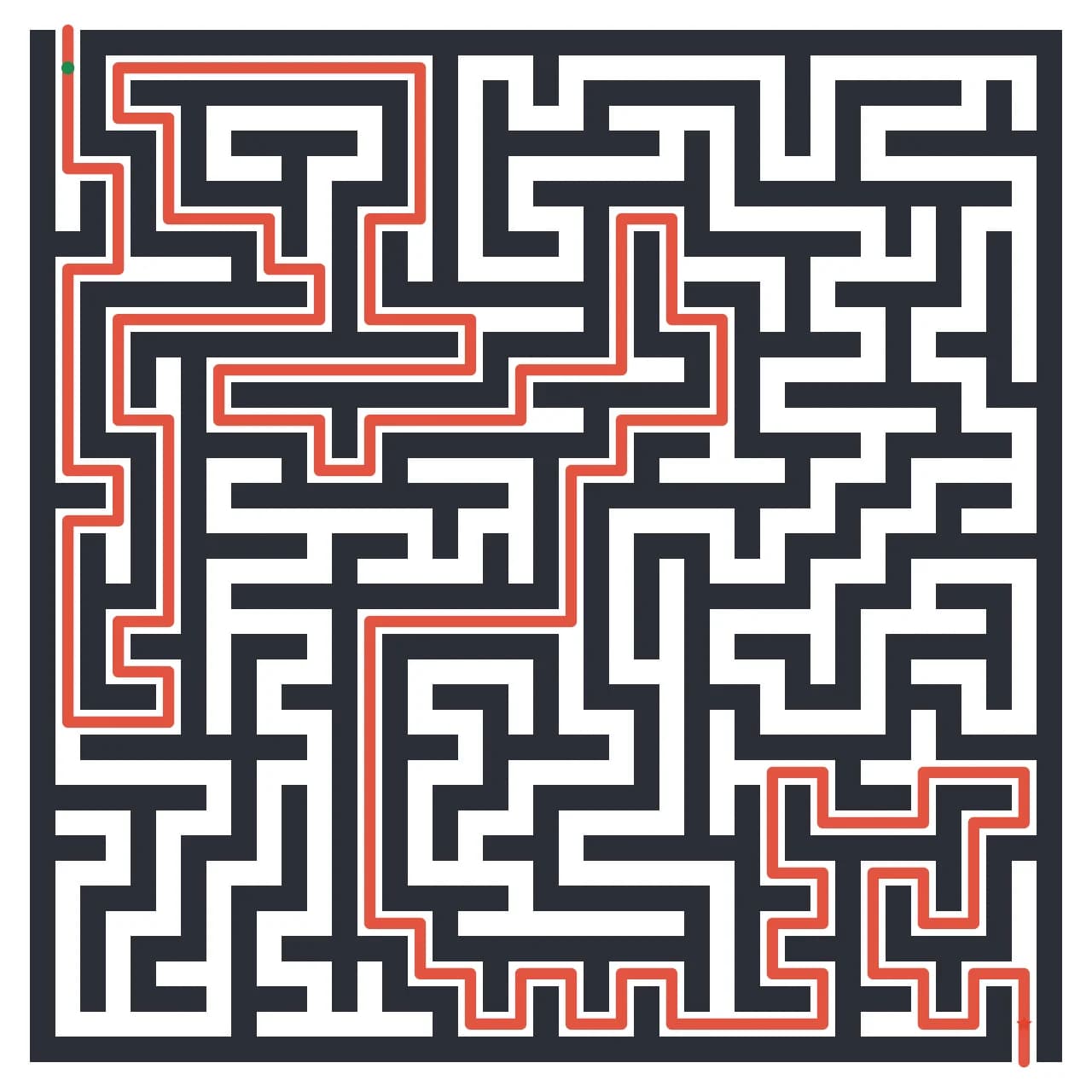
- Test input
- 20 x 20 grid, seed sample-pixel-maze-generator
- Output
- PNG + PDF with answer key
- Cells
- 400
- Dead ends
- 43
- Loops
- 0
- Answer length
- 147 cells
- PDF size
- 18 KB
- Build time
- 20 ms
How we check mazes: a solver walks every maze before it is saved, and we open each PDF to check the page, the answer key and the print size. More on the about page.
Pixel maze generator FAQ
How many blocks wide is a pixel maze?
Take the number of columns, double it and add one. So a 25 column maze is 51 blocks wide, and the same rule works for rows.
Can I make a round pixel maze?
No. The block style needs square cells, so circle mazes always print with classic lines.
Can I edit the blocks in a drawing app?
Yes. Download the PNG at 300 DPI and open it in any paint program. Pro also adds an SVG file, which is easy to recolor.
Does the pixel style change the solution?
No. The style only changes how the walls are drawn. The same seed and size give the same maze in every style.