Maze maker: design your own maze, one control at a time
This maze maker lets you design your own maze in about a minute. Pick a shape and a size, then choose how the paths feel and how the page looks. The preview redraws on every change. When it looks right, download a 300 DPI PNG and a PDF with the answer key.
By The Mazeloom team (Product and testing). Last updated .
How to design a maze with the maze maker, step by step
- First, pick Square grid or Circle under Shape and size.
- Then press a difficulty button, or type your own columns and rows.
- Next, choose a path feel under Paths, and add rooms or loops if you want them.
- After that, pick a style and a wall weight, and type a title for the PDF.
- Press New maze until the layout looks good, and note the seed.
- Finally, press Download PNG + PDF to get the puzzle and its answer key.
The live preview is always free, and you get one free PNG and PDF export a day. See the pricing page for Pro, $19 once, with clean files and a commercial license, or read how we test every puzzle.
The maze maker controls, explained one by one
First comes Shape and size. A square grid can run from 4 to 80 columns and rows, so you can draw a tiny warm up or a huge poster. A circle uses rings instead, from 3 to 36. The four difficulty buttons fill in sensible numbers for you. For example, Medium sets 18 columns by 22 rows, or 10 rings on a circle.
Next is Paths. This menu picks the carving method, and each one gives the maze a different feel. Long winding paths make deep corridors that twist for a while before they split. Many short dead ends gives a busy maze full of little traps. Even mix and Unbiased sit between those two.
Then come Rooms and Loops. Rooms open up to 12 halls inside a square grid. Loops sets what share of dead ends get a second way out, from 0 to 100 percent. At 0 there is exactly one route from start to finish. Above 0, the solver has a choice of routes.
Start, finish and the look of the page
Start and finish decides where the solver enters and leaves. You can go from the top left to the bottom right, from the left side to the right side, or from the center to the edge. A circle always starts in the middle and exits through the rim.
After that, Style sets the look. Classic lines is a clean black drawing. Kids uses bold round walls, soft colors, a green start dot and a star at the finish. Block draws the walls as solid squares, like pixel art. Dungeon map adds solid walls, a parchment floor and a grid.
Wall weight comes in thin, medium and bold. Thin lines suit a big expert maze, because the corridors are narrow. Bold lines suit small hands and crayons. Also, you can add a title of up to 60 characters, and choose US Letter or A4 paper.
Why the seed matters in a maze maker
Every maze starts from a seed, which is a short code shown above the preview. The same seed with the same settings always builds the same maze. So if you like a layout, copy the seed into your notes before you move on.
This helps in a few ways. For example, a teacher can rebuild last week's worksheet for a student who lost it. A designer can try three styles on one layout and compare them side by side. In addition, you can type your own seed, such as a class name or a date, using letters, digits and dashes.
When you want something new, press New maze. The tool rolls a fresh seed and keeps all your other settings, so only the paths change.
What you download from this maze maker
One press of Download PNG + PDF gives you three files. First, a 300 DPI PNG of the puzzle. Second, a PNG with the answer route drawn in. Third, a two page PDF, with the puzzle on page one and the answer key on page two. Pro downloads also add an SVG for editing in a design app.
The preview runs in your browser, while the files come from our server with the same code. As a result, the download matches the screen exactly. One export a day is free and carries a small credit line. Pro removes it and adds a commercial license.
Maze maker settings at a glance
| Control | Range or options |
|---|---|
| Shape | Square grid (4 to 80 columns and rows) or Circle (3 to 36 rings) |
| Paths | Long winding, many short dead ends, even mix, unbiased |
| Rooms and loops | 0 to 12 rooms (grid only), 0 to 100% loops |
| Style and weight | Classic, kids, block, dungeon; thin, medium or bold walls |
| Paper | US Letter or A4, with an optional title |
| Downloads | 300 DPI PNG, answer PNG, two page PDF (SVG with Pro) |
Maze maker tested with a real run
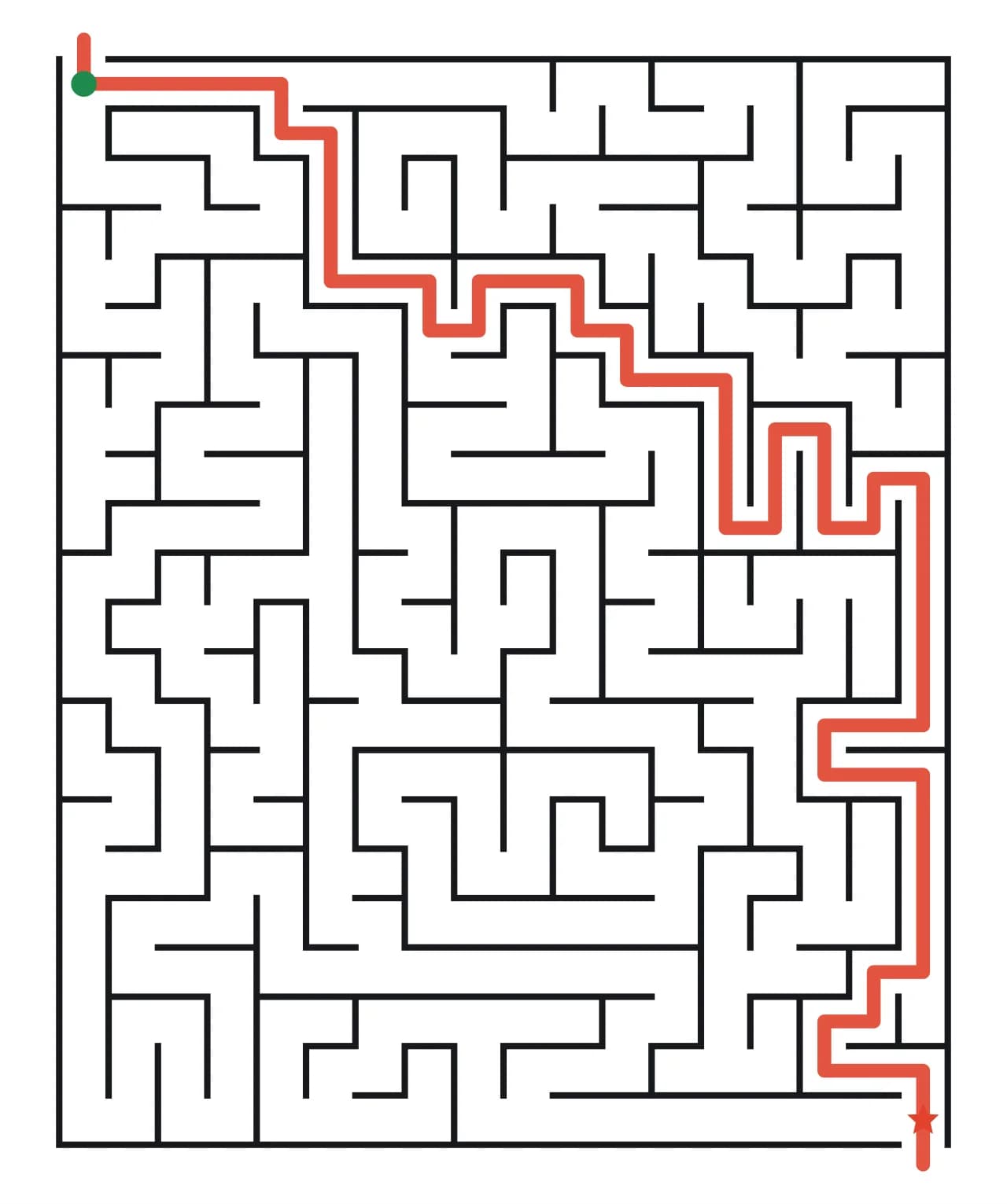
We built this maze with the same code the tool on this page uses, with this page's settings and a fixed seed. So the image and the numbers below come from that run, not from a mockup.
- Test input
- 18 x 22 grid, seed sample-maze-maker
- Output
- PNG + PDF with answer key
- Cells
- 396
- Dead ends
- 39
- Loops
- 0
- Answer length
- 55 cells
- PDF size
- 12 KB
- Build time
- 13 ms
How we check mazes: a solver walks every maze before it is saved, and we open each PDF to check the page, the answer key and the print size. More on the about page.
Maze maker FAQ
Do I need an account to make a maze?
No. The preview and the first export each day work with no account. You only sign in to buy Pro.
How do I make the maze harder?
Add columns and rows, pick Expert, or choose Long winding paths. Also keep Loops at 0, so there is only one route.
Can I save a maze and edit it later?
Yes, through the seed. Write it down with your settings, and the same maze comes back whenever you enter them again.
Can I draw the walls by hand?
No. The engine carves every maze for you and checks that it can be solved. You shape it with the controls instead.