Word search maker: your words, your grid, your level
This word search maker builds a puzzle from words you type yourself. Paste a list of up to 40 words, size the grid to fit them, and choose how hard the hunt should be. The preview updates as you type. Then download a 300 DPI PNG and a PDF with the answers marked.
By The Mazeloom team (Product and testing). Last updated .
How to make your own puzzle with the word search maker, step by step
- First, leave the Theme menu on My own list and type your words in the Word list box.
- Then check the word count next to Word list and set Columns and Rows to match it.
- Next, pick a level under Directions, from Easy to Hard.
- After that, switch Filler letters to Only letters from the words if you want a tougher grid.
- Finally, type a title, press New word search for a fresh layout, and press Download PNG + PDF.
The live preview is always free, and you get one free PNG and PDF export a day. See the pricing page for Pro, $19 once, with clean files and a commercial license, or read how we test every puzzle.
Make your own puzzle from your own words
Start with the words that matter to you. For example, this week's spelling list, the names of everyone at a family reunion or the key terms from a history chapter. Type one per line, or separate them with commas. The small number beside Word list counts them as you go.
You can use short phrases, too. Spaces and punctuation drop out in the grid, so "New York" hides as NEWYORK. However, the word list under the puzzle keeps the phrase as you typed it. Accented letters are folded to plain ones, and any repeat is dropped, so a messy pasted list still works.
Each puzzle holds up to 40 words. If you need more, split them into two puzzles. Alternatively, use the Puzzle book tab, where each block of words becomes its own page.
Grid size versus word count in a word search maker
The grid can be 6 to 25 columns wide and 6 to 25 rows tall, and you set each one on its own. So a wide 20 by 12 grid fits a landscape page, while a tall 12 by 20 grid suits a narrow column.
As a rule of thumb, the grid should be a little wider than your longest word. Then think about the total letters. Ten short words fit easily in 10 by 10. However, 30 long words need something closer to 20 by 20. If the grid is too small, the maker tells you which word it could not place. It never trims a word to make it fit.
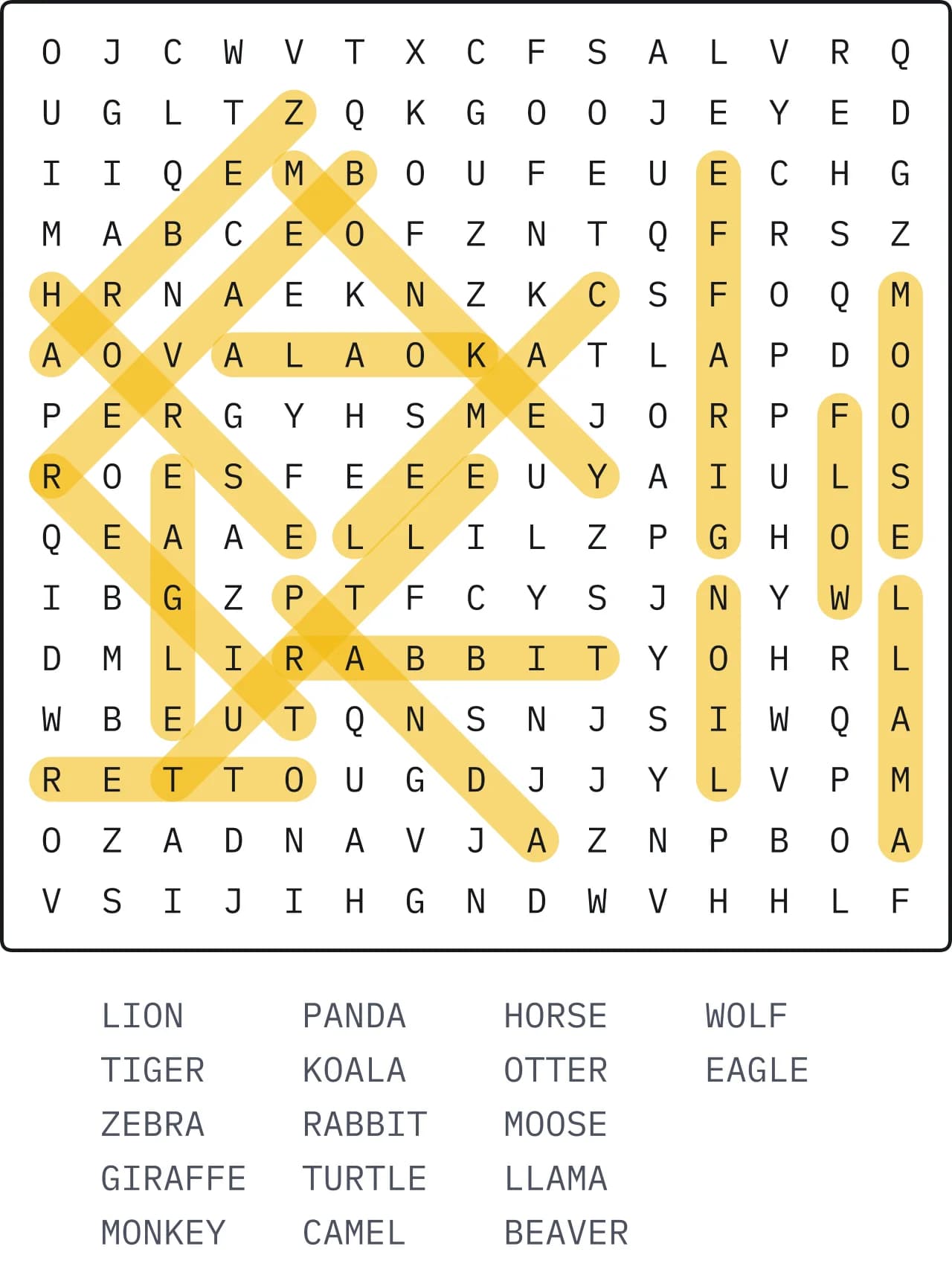
Also, crossing helps. The engine puts the longest words in first and lets words share a letter where they match. As a result, a full list often fits in a smaller grid than you would expect. Our test run below placed 17 words in a 15 by 15 grid with none left out.
Harder options for older solvers
Directions are the main dial. Easy runs words across from left to right and straight down. Medium adds the two diagonals that go down right and up right. Hard opens all 8 directions, so words also run backwards, upward and along every diagonal.
Next, try the filler letters. Only letters from the words fills the gaps with letters that already appear in your list. Because of that, the grid keeps showing pieces of the words you hunt, which slows the solver down.
Finally, hide the word list. Turn off Print the word list, and the puzzle becomes a hidden words challenge. Tell the solver how many words there are, and let them find out what they are.
Where this maker stops
This tool works with your words, so it does not suggest any. There is no AI list builder. It also does not draw shaped puzzles, like a heart or a star, and it cannot place pictures in the grid.
In addition, it does not build crosswords or clue lists, and the puzzles cannot be played online. You get printable files instead: the puzzle, a copy with every word highlighted and a two page PDF.
Word search maker options at a glance
| Option | What you can set |
|---|---|
| Word list | Up to 40 words or phrases, one per line or comma separated |
| Columns and rows | 6 to 25 each, set separately |
| Directions | Easy, Medium (diagonals) or Hard (all 8 ways, backwards too) |
| Filler letters | Any letter A to Z, or only letters from your words |
| Word list on page | Printed under the grid, or hidden |
| Seed | Letters, digits and dashes; the same seed makes the same puzzle |
Word search maker tested with a real run
We built this word search with the same code the tool on this page uses, with this page's settings and a fixed seed. So the image and the numbers below come from that run, not from a mockup.
- Test input
- 15 x 15 grid, 17 words, seed sample-word-search-maker
- Output
- PNG + PDF with answer key
- Words
- 17
- Left out
- 0
- Directions
- hard
- Grid
- 15 x 15
- PDF size
- 15 KB
- Build time
- 26 ms
How we check word searches: a scan confirms that every listed word appears in the grid exactly once, and we open each PDF to check the grid, the answer key and the print size. More on the about page.
Word search maker FAQ
How many words should I use for a 15 by 15 grid?
About 15 to 20 words of average length fit well. Our test run placed 17 words with none left out.
What happens if a word does not fit?
The word search maker shows a note naming that word. Add columns or rows, or shorten the list, and it comes back.
Can I use names and phrases?
Yes. Spaces and punctuation drop out in the grid, while the printed list keeps the phrase as you typed it.
How do I make the puzzle harder?
Choose Hard directions, use only letters from the words as filler, and hide the word list.
Can I sell puzzles I make here?
Yes, with Pro. Each Pro download comes with a commercial license for books, Etsy, TPT and KDP.